Measurements
Measure edge-to-edge, center-to-center or point-to-point, snap to objects or the grid, review the history and export the results as CSV.
 AGBoard - PCBEditor
Measurement and editing
Go beyond passive viewing. Measure real board relationships, adjust supported shapes with numeric dimensions and build repeated production layouts from the same mobile workspace.
Choose Edges, Centers or Points, then select the two references to measure. AGBoard displays the dimension directly on the board with distance, horizontal and vertical offsets, angle, true clearance or overlap.
Editing tools operate on supported source geometry. Move, duplicate, resize or delete selected shapes, apply group transforms and repeat the whole board into a panel.
Measure edge-to-edge, center-to-center or point-to-point, snap to objects or the grid, review the history and export the results as CSV.
Adjust supported dimensions and corner radius with a live preview before applying the change. Width, height and angle are the shape's own, and a shape built from several openings can be taken apart, edited piece by piece and put back as one object.
Screen a solder-paste stencil against IPC-7525C — opening area over aperture-wall area, and width over foil thickness — and export the report as CSV or PDF. You pick the stencil layer and state the foil thickness, which no PCB file carries. For a step stencil, long-press and drag over the board to draw each step zone: the openings across its edge light up, since their foil is not defined. Declared text, legend and fiducials are left out of the count; any other artwork you know takes no paste, you leave out yourself — from the list, or with a tap on the board — and the report says it was you.
Repeat the whole board — every layer, with its components — up to 50 × 50 times. It is a step and repeat, not copies: an edit in one copy is an edit in all, a panel takes the memory of one board, and Gerber, ODB++ and IPC-2581 exports keep it as a step and repeat. Detach the copies when each must change on its own.
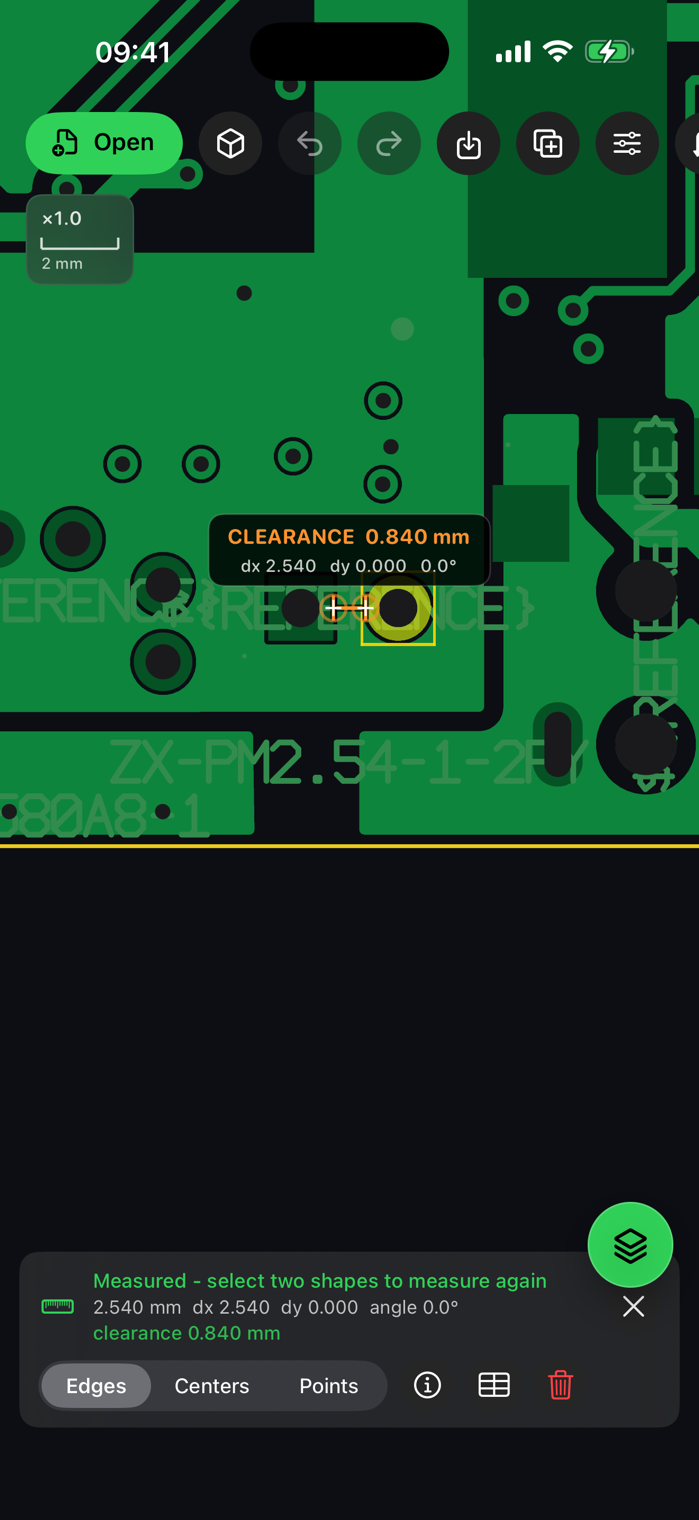
Yes. Edge mode places the dimension on the nearest physical edges and reports clearance or overlap. Center and point modes remain available for placement and mechanical dimensions.
No. The panel is applied when you tap Apply, and the source file is never modified: Remove panel, or Undo, returns to the single board.
Editing depends on what the source format can represent safely. AGBoard keeps unsupported operations explicit instead of silently approximating board data.
Download AGBoard on iPhone or iPad. Five file opens are included before an AGBoard Pro subscription is required.